Why some PDFs can’t be filled in
A PDF is fillable only if whoever made it added form fields, the boxes a viewer lets you click and type into. Plenty of forms never got them. They were designed for paper, saved as PDF and published as they were. Others are scans: a picture of a page, with no text in it at all.
With nothing to type into, the usual choices are poor ones. Print it, fill it in by hand and scan it back. Or add text boxes one at a time and nudge each one until it sits on its line, then do the same for the next forty fields.
Quick check. Open the PDF in your browser and click on an empty line. If a box with a cursor appears, the form has fields and your viewer can fill it in. If nothing happens, it’s a flat form. Read on.
Fill it in with Effortly
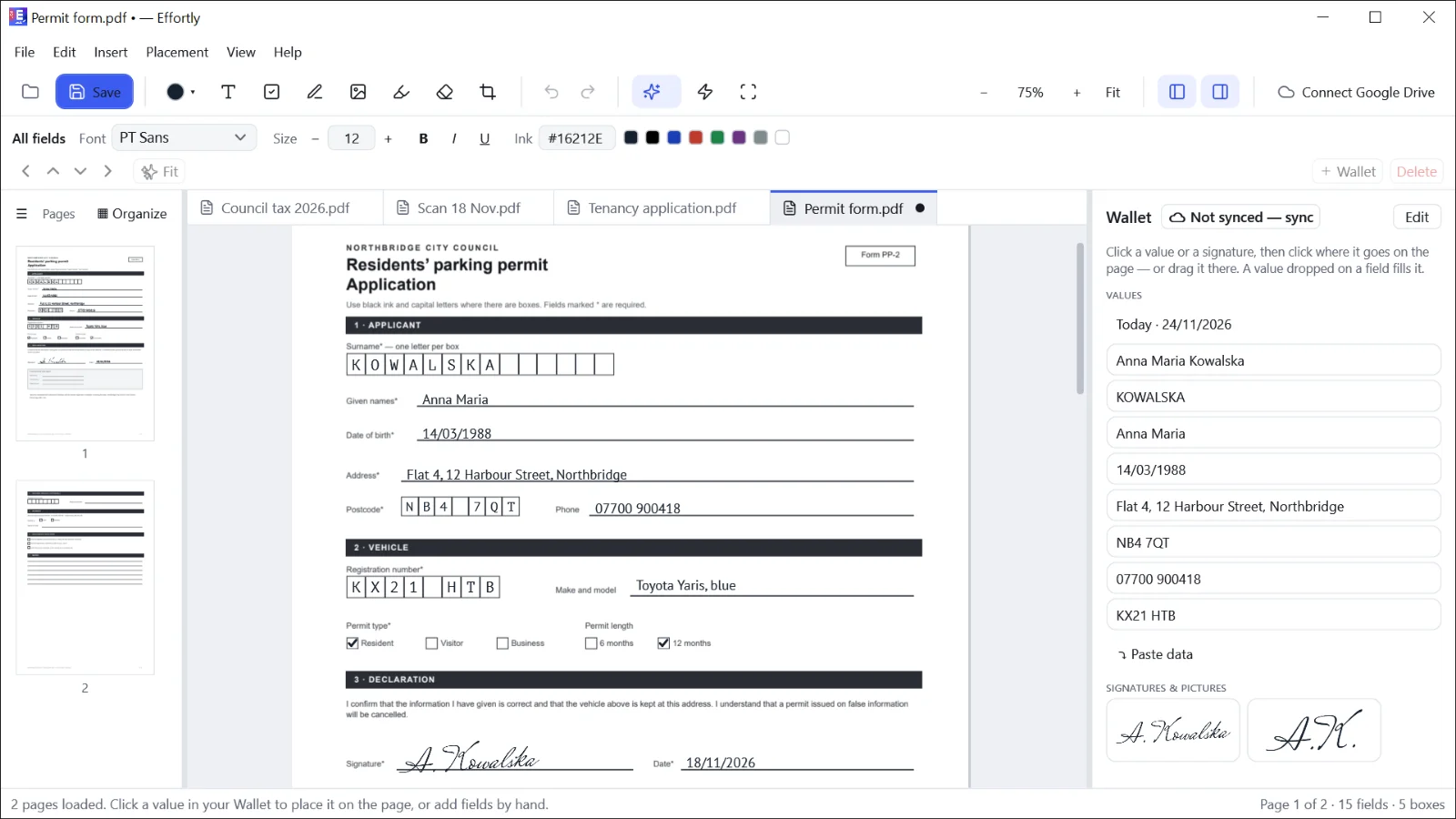
- Open the form. Drop the PDF onto geteffortly.com, or open it in the Android or Windows app. A photo of a paper form works too. The file opens on your device; it isn’t uploaded.
- Click a line and type. Effortly reads the page itself (ruled and dotted lines, rows of letter boxes, table cells) and sets your text on the line you clicked, at a size that fits. There’s nothing to drag into place.
- Tick the boxes. Turn on Quick and a tap on a small square ticks it. A tick can also cover one that’s already printed, if an answer needs changing.
- Sign. Draw your signature once, or upload a photo of it. It waits in your wallet for the next form.
- Save. You get an ordinary PDF that opens in any viewer and prints the way it looks on screen. No watermark, and no account needed.
When a value doesn’t land where you want
- See what was found. The Fields view shows every line, box and cell Effortly recognised on the page (on Windows: View → Show found fields). If a line isn’t there, there’s nothing to snap to.
- Place it yourself. Switch Smart off and a value goes exactly where you click, which is handy for a note in a margin or a free-form box.
- Nudge it. Select a value and move it with the arrow keys, one point at a time (on the phone, with the arrow pad). Fit puts it back on the line or into the cells underneath: Ctrl+Shift+F on Windows, the spark in the centre of the phone’s arrow pad.
- Match the form’s lettering. Click Smart until a small A appears beside it, and your text takes its size from the label printed by the line.
Correcting what’s already printed
Got a form with an old answer already on it? Give your value the Smart background: it covers the printed text but keeps the form’s lines, so the correction doesn’t leave a white patch. The eraser does the same for any area you drag over, with Smart chosen.
Questions
Is it free to fill out a PDF with Effortly?
Yes. Filling in, signing and saving are free, with no account and no watermark on what you save.
Is my PDF uploaded anywhere?
No. The editor runs on your device, in your browser or in the app. Your file isn’t sent to us to fill it in, sign it or save it.
Will other people see exactly what I filled in?
Yes. The saved file is an ordinary PDF with your values on the page, so it looks the same in any viewer and on paper.
Can I do this on my phone?
Yes, in the Android app or in your phone’s browser at geteffortly.com.
Can I finish it later?
Yes. Everything you work on stays in Your documents on that device, every value still editable. Connect your own Google Drive and your ten newest forms are on your other devices too.
Try it on your form
Free · No sign-up · No watermark · Works offline · Files stay on your device